Encryption, HTTPS, and Wi-Fi Security
Firesheep was a free add-on for the Firefox browser, released in October 2010 by a programmer named Eric Butler. It was built for open Wi-Fi, the kind anyone can join without a password. There it listed the people nearby who were signed in to Facebook, Twitter, and other popular sites, with their names and profile photos. Double-clicking a name opened the site as that person. It was downloaded more than 129,000 times in its first day.
Those sites already used HTTPS for the page where people typed their passwords, so Firesheep never saw a password. Work out what it read instead.
After a sign-in, a site hands the browser a cookie, a small piece of text the browser sends back with every later request to that site, so the site knows who is asking. The sites sent their pages, and that cookie, over plain HTTP. Firesheep copied the cookie out of the air and sent it with its own requests, and the site took it for the person who had signed in. Butler said the only real fix was for sites to encrypt every page, not just the sign-in, and that Firesheep would succeed once it stopped working.
Two layers
Traffic from a laptop can travel under two separate layers of encryption, and they cover different stretches of the path. Below is one request from a student's laptop at home, opening an essay draft on the school's class site, cut open to show both.
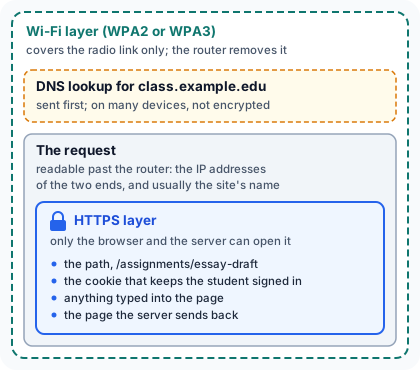
The open networks Firesheep was built for had no Wi-Fi layer, and the sites wrapped only the sign-in page in HTTPS. Every other page, cookie included, crossed the room as plaintext. Butler warned that a shared Wi-Fi password only added one step for anyone who knew it.
A shared passphrase
The student's family has one box that is both its router and its Wi-Fi access point. Its settings page shows this.
Network name:  Apt3B-Home
Security:      WPA2-Personal
Passphrase:    printed on the label under the router
Last winter the family upstairs lost their internet for a week, and a parent gave them the passphrase. Their phones joined and still appear in the router's device list.
WPA2, short for Wi-Fi Protected Access 2, gives each device its own key. Under WPA2-Personal that key comes from the one shared passphrase plus a few numbers the device and the router swap when it joins. Those numbers cross the air unencrypted. So anyone who knows the passphrase and records a device joining can work out that device's key.
One evening someone upstairs starts recording the air. The student's laptop drops off the network and rejoins while the recording runs. A parent's phone joined that morning, while nobody was listening, and has stayed on all day. Which device's Wi-Fi layer could the person upstairs unwrap?
Only the laptop's layer can be unwrapped. The recording holds the laptop's joining numbers, and with the passphrase they give its key. The phone's key came from numbers swapped that morning, so its radio link stays closed until it joins again. That protects it less than it sounds, because a passphrase holder can knock a device off the network for a second and record it coming back. Unwrapping the laptop's Wi-Fi layer leaves its HTTPS layer whole. Anything the laptop sent outside HTTPS is exposed, though, and a plain HTTP page could even be changed on its way in.
KRACK
In October 2017 Mathy Vanhoef, a researcher at KU Leuven, a university in Belgium, showed that an attacker within radio range could read traffic on WPA2 networks without knowing the passphrase at all. He named the attack KRACK. It targets the joining step. The attacker catches one of the messages the router sends while a device joins and sends it again, which tricks the device into installing its key a second time. That resets numbers the encryption depends on never repeating, and the repeats let the attacker decrypt some of the device's traffic. Phones running Android 6.0 or later, and Linux computers, did worse: they installed a key made entirely of zeros, so everything they sent could be read. Vanhoef estimated at the time that 41 percent of Android devices were in that group.
Would a new passphrase have protected the student's family?
It wouldn't have. KRACK never used the passphrase, so changing it changed nothing. The fix was a software update, and it had to reach each device that joins, the laptop and every phone, because KRACK went after the device rather than the router. Microsoft had already shipped one, and Apple and Google followed within weeks, though many older Android phones never received it. An updated device refuses to install the same key twice. Vanhoef added that HTTPS still protected traffic, but not always: in his demonstration he pushed a real site down to plain HTTP, and some apps didn't check their HTTPS connections properly.
The student found that the family's router hadn't installed an update in years. The newest one added WPA3. The family installed it, switched the network to WPA3, which every device in the apartment could use, and chose a new passphrase, since the family upstairs had their own internet back.
HTTPS on every page
Butler got what he asked for slowly. Facebook added an HTTPS setting in early 2011, and in July 2013 turned HTTPS on by default for all its users. It also marked its sign-in cookies secure, which tells the browser to send them only over HTTPS. In July 2018 Chrome began labeling every page loaded over plain HTTP as Not secure. Google tracks the share of Chrome page loads that use HTTPS. It was 30 to 45 percent in 2015 and 95 to 99 percent by about 2020, where it has stayed.
That fix works on an open network, on WPA2, on WPA3, and even on a network an attacker runs, as long as the browser reaches the site over HTTPS. The browser and the server set up the HTTPS key between themselves, and the site's certificate shows the browser it is talking to the real server, so no one in between holds the key. Clicking past a certificate warning gives that protection away.
Sources: Eric Butler, "Firesheep" (October 24, 2010) and "Firesheep, a day later" (October 26, 2010); Mathy Vanhoef and Frank Piessens, "Key Reinstallation Attacks: Forcing Nonce Reuse in WPA2" (2017), and krackattacks.com; Facebook Engineering, "Secure browsing by default" (July 31, 2013); Chromium Blog, "A secure web is here to stay" (February 8, 2018); Google Chrome Security Team, "HTTPS by default" (October 28, 2025).