Requests, Servers, and Domain Names
A link to a game's patch notes lands in a group chat: https://game.example.net/patch-notes. A student opens it at lunch on a laptop joined to the school's Wi-Fi. The page appears in under a second. In that second the laptop found out where the game company's server is. It sent the server a short request across equipment run by several different owners, and got a page back. On October 4, 2021, those same steps stopped working for Facebook, Instagram, and WhatsApp, for people everywhere, for about six hours.
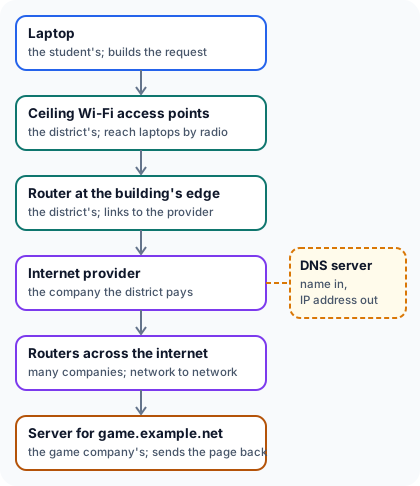
The path
Count the different owners along the way.
Besides the student, there are at least four: the school district, the internet provider, the companies that run the routers in between, and the game company. The district runs two kinds of equipment here. Access points in the classroom and cafeteria ceilings reach laptops by radio and connect through the building's cabling to one router where the building's network meets the provider's. The reply crosses the same kinds of equipment in the other direction, though not always the same routers.
Finding the server
Routers deliver traffic to a number, and a name means nothing to them. Every device on the internet has an IP address, and the request has to carry the server's. The laptop has only the name game.example.net, so before it sends anything it looks the name up.
Lookup:  game.example.net
Answer:  198.51.100.62
The answer came from a DNS (Domain Name System) server, a computer that answers these lookups, usually one run by the school district or its internet provider. That server doesn't hold every address itself: it asks the DNS servers run for example.net, which hold the official answer, and passes it on. The laptop then keeps the answer for a while, often minutes or hours, as set by the name's owner. So the next page from game.example.net needs no second lookup. The kept answer belongs to that exact name, though: a different name under example.net needs a lookup of its own.
Asking for the page
Once it has the address, the laptop sends its request to 198.51.100.62. In its simplest version, HTTP/1.1, the request's first two lines are these.
GET /patch-notes HTTP/1.1
Host: game.example.net
GET asks for the page at /patch-notes, and Host names the site, since one server can answer for many names. The server's reply opens with a line such as HTTP/1.1 200 OK, where 200 means the request succeeded, and the page follows. The server knows what the first line asks for, and the browser knows what 200 means, because both follow the same rules, HTTP. The link starts with https, so this exchange is HTTP sent over an encrypted connection. The connection is scrambled, so the equipment in between carries text it can't read. The lookup that came first isn't part of this connection, and on many devices it travels unencrypted. The Foundations lesson on encryption and Wi-Fi security explains how.
Reading the address
The link the student opened has three parts. The domain name is everything between https:// and the next single slash.
| Part | In this link | What it decides |
|---|---|---|
| Scheme | https | Which protocol to use |
| Domain name | game.example.net | Which server to ask for, by the name DNS looks up |
| Path | /patch-notes | Which page on that server |
A week later the same chat gets a second link. Whose server does it reach?
https://game.example.net-patches.test/update
It reaches a server chosen by whoever registered net-patches.test. The two labels at the right end are net-patches and test, so the registered domain is net-patches.test. The hyphen glued "net" onto that owner's label, and game.example in front is two more labels that owner picked. Reading from the left and stopping at the first familiar name is the usual mistake, and many look-alike links are built to invite it.
The Facebook outage
The Facebook outage began a little before noon Eastern time. For someone opening Instagram that afternoon, which step in the figure failed first?
The lookup did. The DNS server answering that person's device, usually their provider's, tried to ask Facebook's own DNS servers for the address and couldn't reach them at all. It had no answer to give. Without an address the app had nowhere to send a request, and as the next section shows, an address wouldn't have helped anyway. Downdetector, a site that collects reports of outages, logged more than 10.6 million problem reports from around the world. No outage before it had drawn as many.
Routes
Facebook's DNS servers had become unreachable because of how routers find their way. A router learns where to send traffic from announcements its neighbors make. Each one amounts to "addresses in this range can be reached through me." Facebook's routers, and its DNS servers too, made those announcements for Facebook's networks. The announcements follow a protocol of their own, BGP (Border Gateway Protocol), used by the routers that join one network to another.
Facebook's data centers, the buildings full of its servers, are linked by a network of its own. That morning, during routine maintenance, a command meant to check that network's capacity disconnected it instead. A bug in the tool that should have blocked the command let it through. The data centers were cut off. Facebook's DNS servers are built to stop announcing themselves when they lose contact with the data centers, and they did. Now routers everywhere had no route to the DNS servers either.
Restoring service
Facebook's engineers couldn't fix their routers from their desks. The network they normally used to reach them was the one that was down, and the failed lookups had also disabled many of their own tools. So the company sent people to its data centers in person. That took time, because the buildings are hard to get into and the routers are hard to change even with physical access, both on purpose. Service began coming back about six hours after it went down. In Facebook's account of the outage, its head of infrastructure wrote that the extra security was worth the slower recovery.
Sources: Facebook Engineering, "More details about the October 4 outage" (October 5, 2021); Cloudflare, "Understanding How Facebook Disappeared from the Internet" (October 4, 2021); Downdetector, post on X (October 4, 2021).