Algorithms and Sequential Search
What an algorithm is
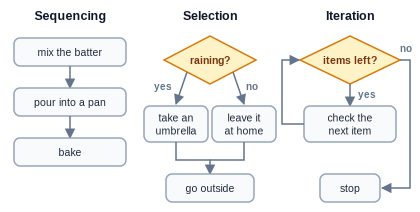
An algorithm is a finite set of instructions that accomplish a specific task.Every algorithm can be built from combinations of sequencing, selection, and iteration. You have been writing all three since the first unit of this course. This lesson names them.
| Building block | What it means |
|---|---|
| Sequencing | the steps of an algorithm run in the order the statements are written, the way the steps of a recipe have to happen in order |
| Selection | a condition being true or false decides which parts of the algorithm run, which is what an if statement does |
| Iteration | a portion of the algorithm repeats, either a set number of times or until some condition is met |
Building on existing algorithms
Algorithms can be created from an idea, by combining existing algorithms, or by modifying existing algorithms. Knowing some existing algorithms helps in constructing new ones. Some of them come up again and again. One finds the maximum or minimum of two or more numbers. Another computes the sum or average of two or more numbers. Others decide whether one integer is evenly divisible by another, or find a robot's path through a maze.Building a new algorithm from existing correct ones has benefits. It can reduce development time and testing, and it makes errors easier to find, because the reused parts are already known to work.
The program below runs that function on the heights of five sunflowers, in centimeters. Run it, then change it and run it again:
• Add
console.log("best so far:", best); on a new line inside the loop, just after the closing brace of the if.• Keep that line, then swap 142 and 181 in the list.
• Change
> to < in the if line.function largest(list) {
let best = list[0];
for (const item of list) {
if (item > best) {
best = item;
}
}
return best;
}
let heights = [142, 167, 129, 181, 158];
console.log("largest(heights) returned", largest(heights));
Output
Press Run to see what this program prints.
Note: This IDE is for experimenting with the code in this lesson. Your changes are not saved, and refreshing the page puts back the original lesson code.
Sequential search
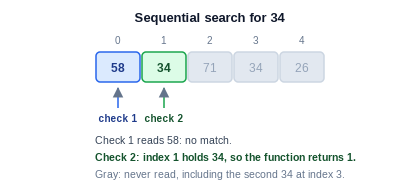
A sequential search, also called a linear search, checks each element of a list in order until the value it is looking for is found or every element has been checked.The version below hands back the INDEX where the target sits, or -1 when the target is not in the list at all.
The middle call is the one worth pinning down. temps holds a 34 at index 1 and another at index 3, and the answer is 1: the return fires on the FIRST match, and the rest of the list is never looked at.
Below, the same sequential search has one line added: it prints every element it checks. It searches a lunch menu for
wanted and then for a dish that is not on it. Run it, then change it and run it again:• Change the first "tacos" in the list to "salsa".
• In
let wanted = "tacos";, change "tacos" to "soup".• Add
console.log("indexOf gives:", menu.indexOf(wanted)); as the last line of the program.function locate(values, wanted) {
for (let i = 0; i < values.length; i++) {
console.log("Index", i, "holds", values[i]); // shows each check
if (values[i] === wanted) {
return i;
}
}
return -1;
}
let menu = ["soup", "salad", "tacos", "pasta", "curry", "tacos"];
let wanted = "tacos";
console.log("Found at:", locate(menu, wanted));
console.log("Found at:", locate(menu, "pizza"));
Output
Press Run to see what this program prints.
Note: This IDE is for experimenting with the code in this lesson. Your changes are not saved, and refreshing the page puts back the original lesson code.