Lossless and Lossy Compression
Lossless Compression
Picture an image made of three wide horizontal bands of solid colour: black across the top, red across the middle, gold across the bottom. Stored as a bitmap it is one colour value per pixel, row after row, from the top left to the bottom right.What would that bitmap data look like? A lot of the data would be the same. Is there a way to encode the image with an abbreviation for "500 black pixels" rather than listing each pixel individually?
That question is where compression starts. Data compression can reduce the size, meaning the number of bits, of stored or transmitted data.
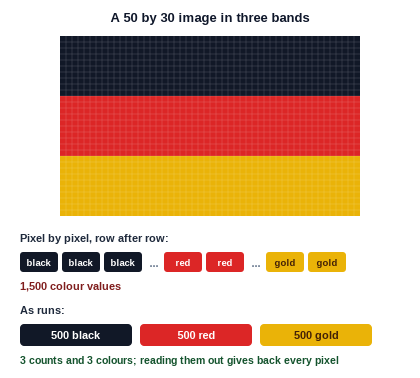
Writing each stretch of one colour as a count and the colour, as in the figure, is called run-length encoding. It pays off only when the stretches are long.
The program below run-length encodes one row of pixels. Each letter is one pixel's colour, N for navy and L for lime, and each run is written as its count followed by its colour. Run it, then change
row and run it again:• Make the first run of N longer.
• Change
row to "NLNLNLNLN", where no pixel matches its neighbour.• Change
row to one letter repeated eight times.let row = "NNNNNNNNNLLLLLNNNNNNNN";
let encoded = "";
let pairs = 0;
let current = "";
let count = 0;
for (const pixel of row) {
if (pixel === current) {
count = count + 1;
} else {
// a new colour starts: write down the run that just ended
if (count > 0) {
encoded = encoded + count + current + " ";
pairs = pairs + 1;
}
current = pixel;
count = 1;
}
}
encoded = encoded + count + current;
pairs = pairs + 1;
console.log("Row:", row);
console.log("Runs:", encoded);
console.log("Pairs stored:", pairs);
Output
Press Run to see what this program prints.
Note: This IDE is for experimenting with the code in this lesson. Your changes are not saved, and refreshing the page puts back the original lesson code.
GIF
CompuServe develops GIF, the Graphics Interchange Format, in 1987. It can be pronounced "GIF" or "JIF".Unlike bitmaps, GIFs are compressed: they can represent exactly the same information as some bitmaps using a smaller number of bits. GIF compresses with an algorithm called LZW. It keeps a dictionary of the colour sequences it has already seen and writes each later repeat as one short code. A long run of one colour is the simplest repeated sequence there is. A pattern that repeats across a row, such as red, white, red, white, is another.
That is why the banded image is such a good candidate. Almost every pixel in it has a neighbour on its left of exactly the same colour, which is another way of saying that its bitmap is full of redundancy. A photograph of gravel has very little.
What lossless means
This method is called lossless compression. Lossless compression algorithms can usually reduce the number of bits stored or transmitted while guaranteeing complete reconstruction of the original data. The word usually matters: data with little redundancy, like the photograph of gravel, may hardly shrink at all.Thus fewer bits does not necessarily mean less information.
Besides images, you may have used RAR, ZIP, GZIP or LZW to compress any file.
Lossy Compression
While lossless compression preserves all of a file's data, lossy compression throws away some data in the interest of compressing the file even more.Lossy data compression algorithms can significantly reduce the number of bits stored or transmitted, but they only allow reconstruction of an approximation of the original data.
Effective lossy compression should preserve the essential data. You use effective lossy compression every time you text someone.
The program below is a very simple lossy compressor for one row of colour values. A counting loop that steps by 2 stores every other value, and the row is rebuilt by using each stored value twice. Run it, then change it and run it again:
• Change the second number in
row to 0. Stored and Rebuilt stay the same, because that value was never stored.• Change the first number in
row to 0.• Add two more numbers to the end of
row.let row = [70, 70, 110, 130, 130, 130, 220, 230];
let stored = [];
for (let i = 0; i < row.length; i = i + 2) {
stored.push(row[i]);
}
let rebuilt = [];
for (const value of stored) {
rebuilt.push(value);
rebuilt.push(value);
}
let exact = 0;
for (let i = 0; i < row.length; i++) {
if (rebuilt[i] === row[i]) {
exact = exact + 1;
}
}
console.log("Original:", row);
console.log("Stored: ", stored);
console.log("Rebuilt: ", rebuilt);
console.log("Values stored:", stored.length, "of", row.length);
console.log("Values back exactly:", exact, "of", row.length);
Output
Press Run to see what this program prints.
Note: This IDE is for experimenting with the code in this lesson. Your changes are not saved, and refreshing the page puts back the original lesson code.
GIF uses lossless compression. JPEG, the Joint Photographic Experts Group format, uses lossy compression. PNG, the Portable Network Graphic, is another popular format.
Choosing between them
The amount of size reduction from compression depends on both the amount of redundancy in the original data representation and the compression algorithm applied. Change either one and the saving changes.Lossy data compression algorithms can usually reduce the number of bits stored or transmitted more than lossless compression algorithms. That is the whole reason lossy compression exists. It buys the extra saving with data it has decided it can do without.
| Compare on | Lossless | Lossy |
|---|---|---|
| What you get back | The original data, exactly | An approximation of the original |
| How much smaller | Less reduction | Usually more reduction |
| Typically chosen when | Quality or the ability to reconstruct the original is maximally important | Minimising data size or transmission time is maximally important |
| Examples | GIF, RAR, ZIP, GZIP, LZW | JPEG |