Hash Functions, Digital Signatures and HTTPS
Digital Signatures
A public key can encrypt something that only the matching private key can decrypt. That is the arrangement for receiving a secret message.The reverse is also possible: encrypting with the private key something that can be decrypted with the public key. This is what digital signatures use.
• A server encrypts data with its private key.
• Anyone can decrypt it using the server's public key.
• This acts as an unforgeable signature, because only the owner, who alone holds the private key, could have produced it.
• It proves that you are getting data from the right server or website, and not from an imposter.
This is how your browser knows that you are at the real bankofamerica.com and not at a fake Bank of America website. The browser does not come knowing the bank's public key. The site sends a certificate that holds its public key and is signed by a certificate authority. The browser already trusts that authority's own public key, which ships with the browser or the operating system. If the signature on the certificate checks out, the site still has to prove it holds the private key that matches the public key inside it. When it does, you get the padlock.
Certificate Authorities
Certificate authorities issue digital certificates that validate the ownership of encryption keys used in secure communications, and they are based on a trust model. Google, for example, is a certificate authority. A website can apply for a digital certificate from Google to validate the ownership of their website. That is the padlock you see when you visit an https, or secure http, website.We can understand how digital signatures work by looking at hash functions.
Hash Functions
In the abstract, a cryptographic hash function is a mathematical function that takes input data of any size, performs an operation on it, and returns output data of a fixed size.Since data of any kind, whether a file, an image, audio or video, can be encoded as a string of zeros and ones, a hash function is a function f(x) which accepts a string input of any length and returns a fixed-length string output.
The hash function in everyday use is SHA-256, and the fastest way to get a feel for one is to look at what goes in and what comes back.
SHA-256, in and out
SHA-256 returns 256 bits for anything it is handed. Those bits are written in hexadecimal, where one character stands for four bits, so a digest reads as 64 characters, and it is 64 characters for every input the function is ever given.JavaScript in a browser has SHA-256 built in, reached through the Web Crypto API as
crypto.subtle.digest. That call is asynchronous: it does not hand back the digest on the spot, it hands back a promise to deliver one shortly, so it is not something the editor in this course can print for you. Nothing in the rest of this lesson depends on running it.Here are four inputs and the digest SHA-256 returns for each of them.
| Input | SHA-256 digest |
|---|---|
hello, 5 characters | 2cf24dba5fb0a30e26e83b2ac5b9e29e1b161e5c1fa7425e73043362938b9824 |
Hello, the same word with one letter of case changed | 185f8db32271fe25f561a6fc938b2e264306ec304eda518007d1764826381969 |
| the empty string, 0 characters | e3b0c44298fc1c149afbf4c8996fb92427ae41e4649b934ca495991b7852b855 |
| the letter a repeated one million times | cdc76e5c9914fb9281a1c7e284d73e67f1809a48a497200e046d39ccc7112cd0 |
The program below holds the four digests from the table as strings. It counts the positions where two of the digests agree, and prints how many characters each one has. The number of characters in
first is first.length, and its character at position i is first[i], counted from 0 as in an array. Run it, then change it and run it again:• Change
second to empty, then to millionAs.• Change
second to hello, so that the program compares a digest with itself.// SHA-256 digests, copied from the table
let hello = "2cf24dba5fb0a30e26e83b2ac5b9e29e1b161e5c1fa7425e73043362938b9824";
let capitalHello = "185f8db32271fe25f561a6fc938b2e264306ec304eda518007d1764826381969";
let empty = "e3b0c44298fc1c149afbf4c8996fb92427ae41e4649b934ca495991b7852b855";
let millionAs = "cdc76e5c9914fb9281a1c7e284d73e67f1809a48a497200e046d39ccc7112cd0";
let first = hello;
let second = capitalHello;
let same = 0;
for (let i = 0; i < first.length; i++) {
if (first[i] === second[i]) {
same = same + 1;
}
}
console.log("Characters in each digest:", first.length, "and", second.length);
console.log("Positions that agree:", same);
Output
Press Run to see what this program prints.
Note: This IDE is for experimenting with the code in this lesson. Your changes are not saved, and refreshing the page puts back the original lesson code.
| Property of an ideal hash function | What it says |
|---|---|
| Deterministic | The same message always results in the same hash. |
| Quick to compute | The hash value for any given message is fast to work out. |
| Infeasible to invert | Given a hash value, it is infeasible to generate a message that yields it, which is to say, to reverse the process that produced it. |
| Collision resistant | It is infeasible to find two different messages with the same hash value. |
| Avalanche | A small change to a message changes the hash value so extensively that the new hash value appears uncorrelated with the old one. |
The third property is the hard one to feel. Given
y = e3824dba5fb0a30e26e8352ac5b9e29e1b161e5c1fa7425e73043362938b9829
it is hard to find an x with hash(x) = y. Nobody knows a shortcut. The only method anyone has is to guess an x, hash it, and see whether the output matches, and there are far too many candidates for that to end.
Digital Signature
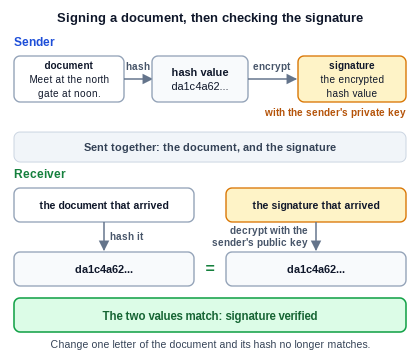
To make a digital signature, apply the hash function to the message and obtain a fixed-size string, the hash value. Then encrypt this hash value using the sender's private key. The encrypted hash value is the digital signature. Attach it and send it along with the original message. Encrypting the short, fixed-size hash is quicker than encrypting the whole message, and it is all the check needs. It is not necessary to encrypt the original message if we are not concerned with the secrecy of the message.The receiver of the message takes the encrypted hash value and the sender's public key and decrypts it. He then applies the hash function to the received message, and if the two hash values match, the identity of the sender has been verified.
| Step | The sender does | The receiver does |
|---|---|---|
| 1 | Hash the document to get a hash value. | Hash the document that arrived to get a hash value. |
| 2 | Encrypt that hash value using the private key. | Decrypt the attached hash value using the sender's public key. |
| 3 | Attach the encrypted hash value to the document and send both across the internet. | If the two values are the same, the signature is verified. |
| What you want | Key you use | What it gives you |
|---|---|---|
| Send a document only one person can read | That person's public key | Secrecy. Only their private key opens it. |
| Read a document that was sent to you that way | Your own private key | The document. |
| Sign a document you are sending | Your own private key | Proof of who sent it, and that it was not altered. |
| Check somebody else's signature | That sender's public key | A hash value that either matches, or does not. |
How HTTPS Works
The key parts of modern cryptography are symmetric encryption, key exchange and public-key cryptography. When you connect to a secure website using HTTPS and see the padlock, you know that cryptography was used to encrypt the data.When information is sent over regular HTTP, it is broken into packets of data that can easily be sniffed using free software. That makes communication over an unsecure medium, such as public Wi-Fi, highly vulnerable to interception. All communications that occur over HTTP occur in plain text, which makes them highly accessible to anyone with the correct tools, and vulnerable to on-path attacks.
Technically speaking, HTTPS is TLS/SSL encryption over the HTTP protocol rather than a separate protocol from HTTP.
The handshake, one link at a time
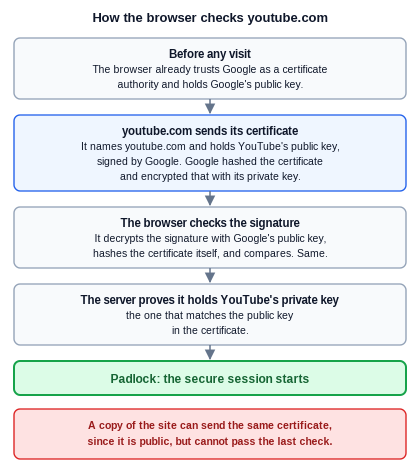
• YouTube has a keypair. The private key never leaves YouTube's servers. A certificate authority issues YouTube a digital certificate. It names youtube.com and includes YouTube's public key, and only that key.
• When a user connects to youtube.com, YouTube sends its SSL certificate. It contains the public key needed to start the secure session. How do we know that this certificate is authentic?
• YouTube's certificate authority is Google. Google signs the certificate by hashing it and encrypting that hash with its own private key.
• Your browser already holds Google's public key. Google is on the browser's list of trusted certificate authorities. The browser decrypts the signature with Google's public key, hashes the certificate itself, and compares the two. If they match, the certificate is genuine and unaltered. So the key inside it is YouTube's.
• The server then proves it holds the private key that matches that public key. Only then does the secure session start. The padlock is the indicator of that verification.
• A copy of YouTube can send the same certificate, since a certificate is public. The copy fails the last step, because YouTube's private key never left YouTube. The browser warns instead of showing the padlock.