Packets, Routing, Bandwidth and Latency
Packets
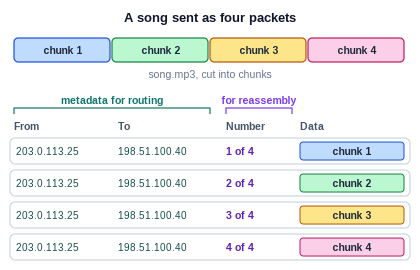
The Internet transmits data streams from one computer to another by breaking the data down into small manageable units known as packets. This system is called a packet-switching system.A packet is a small chunk of digital data that contains both a sender address and an address for where the packet is supposed to go.
A single image could contain anywhere from just a handful of packets to upwards of 10,000, depending on a variety of factors.
The process of determining where packets go is called routing, or selecting a path for traffic in a network.
Routing is dynamic
A packet-switching system is similar to traffic routing. Routing on the Internet is usually dynamic, meaning it is not specified in advance.Each packet carries a chunk of the data, plus metadata. The metadata is used for routing the packet between the origin and the destination, and for reassembling the data when it arrives. The addresses are part of that metadata: a packet has to carry, on itself, everything a router needs in order to decide where to send it next.
The metadata also records where the chunk belongs in the whole. Packets may arrive at the destination in order, out of order, or not at all. The receiving computer has to put the chunks back in the right order and notice any that are missing.
Redundancy and fault tolerance
In packet routing, a certain connection might only be able to transfer a certain number of packets per minute. If it cannot transfer them quickly enough, or stops working, a router has to find a new path for the packets. It can do that only because the network was built with more than one way to route data. One way to accomplish network redundancy is by having more than one path between any two connected devices.Redundancy is the inclusion of extra components that can be used to mitigate failure of a system if other components fail. Redundancy increases the reliability of the Internet and helps it scale to more devices and people. Redundancy within a system often requires additional resources, extra cables and routers paid for before anything breaks, but it can provide the benefit of fault tolerance.
When a system can support failures and still continue to function, it is called fault-tolerant. This matters because the parts of a complex system fail at unexpected times, often in groups. A power cut can take down every router in a building at once. Fault tolerance allows users to continue to use the network.
The Internet has been engineered to be fault-tolerant, with abstractions for routing and transmitting data. A sender hands its packets to the network without choosing their route, and the routers deal with whatever has failed. If a particular device or connection fails, the data that follows is sent by a different route, if possible. When no other route exists, those packets are not delivered.
So routing is dynamic and fault tolerant.
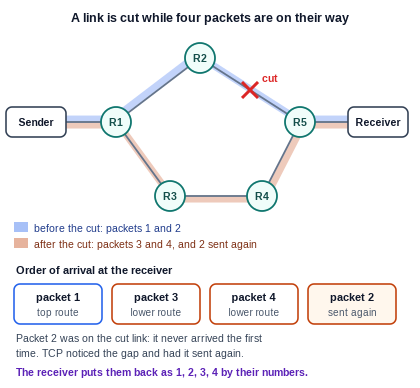
In the figure, packet 2 was crossing the link when it was cut, and it was lost. The routers sent packets 3 and 4 the long way round, and both arrived before packet 2 was sent again. The numbers in the metadata let the receiver put all four back in order.
The program below plays the receiving computer. Each packet that arrived is a record of its number and its chunk of a message. The array holds them in the order they arrived, and
total is how many packets the message was cut into. The program puts the chunks back in order by their numbers and reports any number that never came. Run it, then change it and run it again:• Put the packets in the array in a different order.
• Add
{ number: 4, chunk: "later " } anywhere in the array.• Remove the packet numbered 1 from the array.
let total = 5;
let arrived = [
  { number: 3, chunk: "rain " },
  { number: 1, chunk: "Pack a coat, " },
  { number: 5, chunk: "today." },
  { number: 2, chunk: "it may " },
];

let message = "";
for (let number = 1; number <= total; number++) {
  let found = false;
  for (const packet of arrived) {
    if (packet.number === number) {
      message = message + packet.chunk;
      found = true;
    }
  }
  if (!found) {
    console.log("Packet", number, "is missing");
    message = message + "(missing) ";
  }
}
console.log("Message:", message);
Output
Press Run to see what this program prints.
Note: This IDE is for experimenting with the code in this lesson. Your changes are not saved, and refreshing the page puts back the original lesson code.
Bandwidth and Latency
When you have a large system there is going to be latency. The latency of a system is the measure of the time it takes for a message to get to its intended recipient, from the time it was sent.Another way to measure a system's effectiveness is with bandwidth. The bandwidth of a computer network is the maximum amount of data that can be sent in a fixed amount of time. Bandwidth is usually measured in bits per second.
The amount of data is measured in bits. A home connection's bandwidth might be anywhere from a megabit, about a million bits, per second, to a gigabit, about a billion bits, per second.
Downloading an email requires less bandwidth than watching a movie.
Bandwidth also gives the shortest possible time for a transfer. A 500-megabit file sent on a link with a bandwidth of 25 megabits per second needs at least 500 divided by 25, which is 20 seconds. It takes longer whenever the link runs below its maximum or is shared.
The program below does the same division for a 720-megabit file on links with three different bandwidths. Run it, then change it and run it again:
• Change
fileMegabits to 1440, twice the size.• Put 20 in the array of bandwidths, after 10.
let fileMegabits = 720;
let bandwidths = [10, 40, 100];
for (const bandwidth of bandwidths) {
  let seconds = fileMegabits / bandwidth;
  console.log(bandwidth, "megabits per second: at least", seconds, "seconds");
}
Output
Press Run to see what this program prints.
Note: This IDE is for experimenting with the code in this lesson. Your changes are not saved, and refreshing the page puts back the original lesson code.
| Bandwidth | Latency | |
|---|---|---|
| What it measures | The most data that can be sent in a fixed amount of time | How long a message takes to reach its recipient after it was sent |
| What it is counted in | Bits per second | Time |
| The everyday word for it | Often called speed, though it is a maximum: the most the connection can carry each second | Lag, or delay |