Wireless Hardening
Barry Ardolf wanted to make trouble for the family who lived next door. From his house in Blaine, Minnesota, he set to work in 2009 on their home Wi-Fi network, whose signal came through the walls. The network was encrypted, but with WEP, the same encryption the TJX crew had cracked four years earlier. Using a cracking program and how-to guides, he recorded the network's traffic for days and worked out its key. Then he joined their network and used it to send email that looked as if it came from the man next door: messages to his coworkers and, in May 2009, threats to kill Vice President Joe Biden.
The family's router had encryption turned on, so it looked protected. What should it have been using instead?
WEP's key falls to recorded traffic, so the family's router should have been using WPA2, and a router today should use WPA3. WPA, the stopgap that followed WEP, and WPS, a setup shortcut covered below, have known weaknesses too.
Wi-Fi for the stadium
The high school wants Wi-Fi at the football stadium, for the announcer's booth, the band, and the team's video staff along the sideline. The stadium's single access point, on the press box, barely reaches the far bleachers, and behind the press box is a street lined with houses. The school's plan is in the figure.
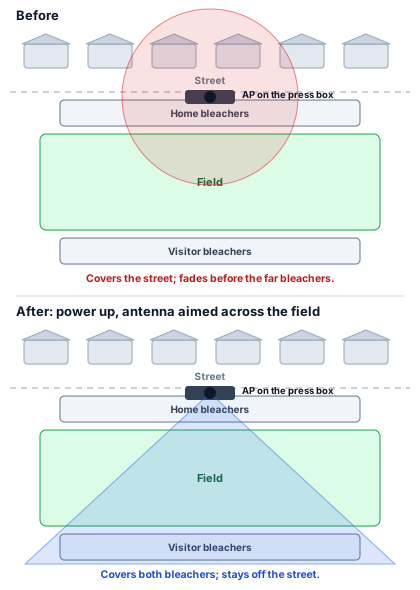
Turning the power up alone would have pushed the signal farther in every direction, including over the houses. A directional antenna sends it where it's wanted: across the field, to both sets of bleachers, and not back over the street. The less of the signal that spills outside the stadium, the less there is for an outsider to work with. Shaping it doesn't replace encryption.
Access points also announce themselves, in the beacon frames an outsider can hear from the street. A school can turn those announcements off, so the network won't show up in a phone's list of nearby networks, though someone with the right tools can still find it.
The WPS button
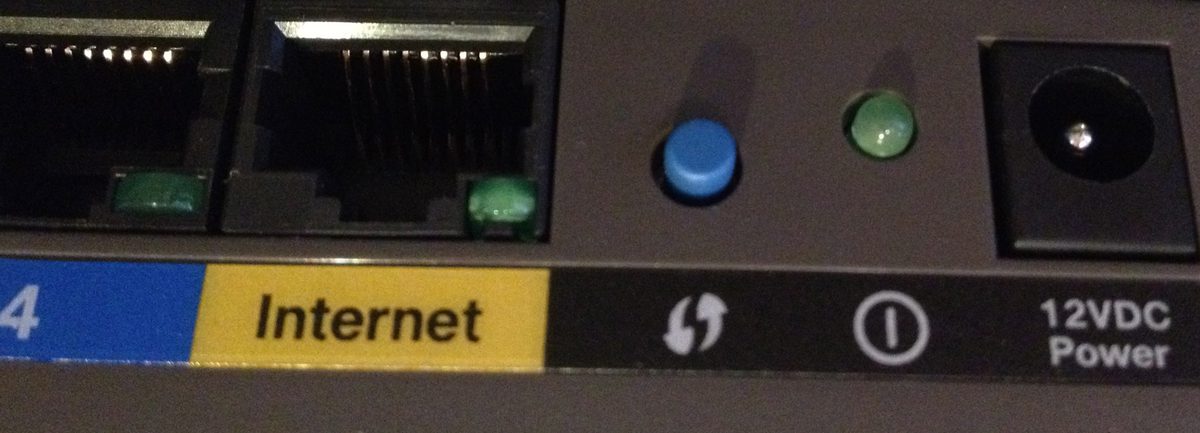
A router donated for the theater's sound booth has a WPS button and an 8-digit PIN printed underneath. WPS, Wi-Fi Protected Setup, allows a device to join by pressing the button or entering the PIN instead of typing the passphrase. A researcher, Stefan Viehböck, showed in 2011 why the PIN is weak. Its last digit is a checksum, worked out from the other seven, and the router checks the first four digits separately from the rest, telling the guesser whether that half was right. Work out the most guesses an attacker needs.
The first half has 10,000 possibilities, from 0000 to 9999, and the second half, three digits plus the checksum, has 1,000. That is at most 11,000 guesses, instead of 100 million for a true 8-digit PIN, which many routers let a program try in hours. The school turns WPS off on every router it owns.
MAC filtering and sign-ins
Encryption keeps outsiders from reading the traffic. Deciding which devices and people may join is a separate control. An access point can keep a list of the hardware addresses it accepts and turn away everything else, which stops a stranger's laptop that just tries to connect. It is easy to get around, though, since an attacker can copy an approved address, and phones that use private, changing addresses make a list hard to keep. The school also wants to know who is on, so its student network asks each person to sign in with their own school account, and the sign-in does the real work.
The Ardolf investigation
Ardolf's emails led investigators first to the family next door, because they came from that family's network. The husband's employer, a law firm, hired an investigator, who examined the family's computers and network, found that an unknown device had been connecting, and, with the family's permission, recorded the network's traffic. The recorded sessions that sent the threats carried Ardolf's name and internet account, and the FBI searched his home in July 2009. He pleaded guilty to federal charges that included unauthorized access to a computer, identity theft, and threatening the vice president, along with other crimes, and in July 2011 a federal judge in St. Paul sentenced him to 18 years in prison.
Sources: U.S. Department of Justice, District of Minnesota, sentencing announcement (July 12, 2011); Wired, "Wi-Fi-Hacking Neighbor From Hell Sentenced to 18 Years" (July 12, 2011); Stefan Viehböck, "Brute forcing Wi-Fi Protected Setup" (December 26, 2011), and US-CERT Vulnerability Note VU#723755 (December 27, 2011).