Documentation and Acknowledging Code
Who is a comment written for?
Answer: a person. The computer skips every comment. A program with its comments deleted runs exactly as before.
Which person, usually?
Answer: the programmer who wrote it, a few weeks later.
Program documentation is a written description of what a code segment, procedure, event or program does, and of how it was developed. A comment is documentation written into the program itself. Think of the label on a freezer container: what is inside, when it was made, written as the lid goes on.
The label has two parts, and so does program documentation. The first says what the code does. The second says how it came to be that way: what was tried and what failed. For example, Marco's notes record that an early version read names from a shared spreadsheet, and that a renamed column ended that design.
Some programming environments have no place to attach a comment. The documentation then lives beside the program: a separate written description, a design sketch, notes in the project folder. Similarly, a freezer with no label slot gets a list taped to the door.
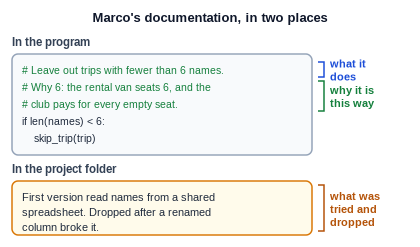
Documentation helps a programmer, alone or on a team, write a correct program and keep it correct. It can do that only as long as it agrees with the code. Suppose the club later finds a smaller van and Marco changes the 6 to a 4. The comment changes in the same edit. A comment that still says 6 above a line that says 4 sends the next reader the wrong way.
The program below works out how many pizzas to order for a class party. Its comments say what the program does, why one number was chosen, and what an early version got wrong. Run it, then change it and run it again:
• Delete every line that starts with
//, and run it again.• Press Reset, then change
let slicesPerPizza = 8; to let slicesPerPizza = 10; and run it. The comment above that line still says 8, and nothing warns about it. Change both 8s in that comment to 10 as well.• Press Reset, then delete the three lines of the
if, from the if line to its closing }, and run it again.// Works out how many pizzas to order for a class party.
let guests = 26;
let slicesEach = 3;
// Why 8: the shop cuts every pizza into 8 slices.
let slicesPerPizza = 8;
let slicesNeeded = guests * slicesEach;
let pizzas = Math.floor(slicesNeeded / slicesPerPizza);
// Round up. A first version stopped at the line above and
// ordered one pizza too few whenever slices were left over.
if (slicesNeeded % slicesPerPizza > 0) {
pizzas = pizzas + 1;
}
console.log("Slices needed:", slicesNeeded);
console.log("Pizzas to order:", pizzas);
Output
Press Run to see what this program prints.
Note: This IDE is for experimenting with the code in this lesson. Your changes are not saved, and refreshing the page puts back the original lesson code.
Whose recipe went into it?
A label often says that too: Grandma's chili. The same question comes up with code. A segment copied from a website, written by a classmate, or built by two people together is not one person's work, and the documentation says so. The acknowledgement gives the origin of the segment or the name of its author, and it can sit in the program documentation.