Bits, Bytes and Place Value
Data
Data values can be stored in variables, lists of items, or standalone constants, and they can be passed as input to (or output from) procedures.Computing devices represent data (text, numbers, audio, images) digitally, meaning that the lowest-level components of any value are bits.
Bit is shorthand for binary digit and is either a 0 or a 1. This system of representing data is called binary (base 2), which uses only combinations of the digits zero and one.
name = "Mike Smith"      # represented internally as 0's and 1's
grades = [87, 91, 75]    # represented internally as 0's and 1's
Thus, digital data is some sequence of 0's and 1's representing some information. An image, an audio recording or a movie can be represented using just 0's and 1's.
Base 10 (Decimal numbers)
Computers store all information in the form of binary numbers. To understand binary numbers, first look at a more familiar system: decimal numbers.Decimal is base 10. It uses 10 digits, 0 through 9. Why do we prefer base 10? There are many reasons but one simple reason is that we have ten fingers.
The name of a base tells you two things at once: how many digits it has to work with, and what each place is worth.
| Base | Name | The digits it uses |
|---|---|---|
| 2 | Binary | 0 1 |
| 8 | Octal | 0 1 2 3 4 5 6 7 |
| 10 | Decimal | 0 1 2 3 4 5 6 7 8 9 |
| 16 | Hexadecimal | 0 1 2 3 4 5 6 7 8 9 A B C D E F |
Each digit has a weight
Each digit has a weight corresponding to a power of 10. Multiply each digit with its weight and then sum. What does 157 mean?157 = 1 x 100 + 5 x 10 + 7 x 1
= 100 + 50 + 7
Nobody thinks about this while reading a price tag, which is the point. The weights are invisible in base 10 only because they are familiar. Here is the same breakdown drawn out, for a different number.
| Place | 10^3 | 10^2 | 10^1 | 10^0 |
|---|---|---|---|---|
| Weight | 1000 | 100 | 10 | 1 |
| Digit | 3 | 2 | 0 | 7 |
| Digit x weight | 3000 | 200 | 0 | 7 |
Base 2 (Binary)
Add the bottom row and you get 3000 + 200 + 0 + 7, which is 3207. The digits did not carry that number by themselves; the weights did.Binary works in exactly the same way, with one change: each weight is a power of 2 rather than a power of 10, so the weights double from right to left instead of multiplying by ten. And there are only two digits available, so every digit is either taking its whole weight or taking none of it.
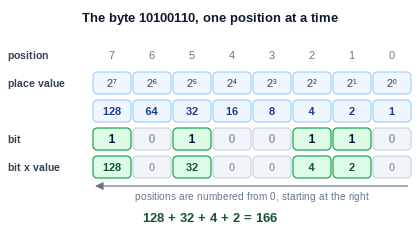
The positions are numbered from the right, starting at 0, and the weight of each position is the base raised to the power of its number. The rightmost digit is in position 0, worth 20 = 1. The digit to its left is in position 1, worth 21 = 2, and so on. So the top row of the table below ends at 2^0, on the right.
| Place | 2^5 | 2^4 | 2^3 | 2^2 | 2^1 | 2^0 |
|---|---|---|---|---|---|---|
| Weight | 32 | 16 | 8 | 4 | 2 | 1 |
| Digit | 1 | 0 | 1 | 1 | 0 | 1 |
| Digit x weight | 32 | 0 | 8 | 4 | 0 | 1 |
Naming the base
32 + 0 + 8 + 4 + 0 + 1 is 45. So those six digits in base 2 and the two digits 45 in base 10 are two names for one number.A common way to mark the base is a small subscript after the numeral, as in 1011₂. This lesson says it in words instead, and so does every problem in this set: 1011 in base 2, or 11 in base 10.
1011 = 1 x 8 + 0 x 4 + 1 x 2 + 1 x 1
     = 8 + 0 + 2 + 1
That sum is 11. So 1011 in base 2 is 11 in base 10.
The program below reads a numeral the way the tables above do.
weights lists the weight of each position, from left to right, in base 2. The program multiplies each digit by its weight and adds the results. Run it, then change it and run it again:• Change
weights to [100000, 10000, 1000, 100, 10, 1], the base 10 weights, and leave numeral as it is.• Change
numeral to "3207" and weights to [1000, 100, 10, 1], and compare each line with the table for 3207.let numeral = "110110";
let weights = [32, 16, 8, 4, 2, 1];
let total = 0;
let i = 0;
for (const ch of numeral) {
let digit = Number(ch);
console.log("digit", digit, "| weight", weights[i], "| digit x weight", digit * weights[i]);
total = total + digit * weights[i];
i = i + 1;
}
console.log(numeral, "with these weights is", total, "in base 10");
Output
Press Run to see what this program prints.
Note: This IDE is for experimenting with the code in this lesson. Your changes are not saved, and refreshing the page puts back the original lesson code.
Comparing binary numbers
Deciding which of two binary numbers is larger does not need either one converted. Align them on the right, so that equal positions share a column, and pad the shorter one with 0s on the left. Then read from the left. The first position where they differ decides it: the number with the 1 there is the larger one, whatever comes after.That works because a 1 in any position is worth more than all the positions to its right put together. Position 3 is worth 8, while positions 0 to 2 together are worth 1 + 2 + 4 = 7. So of two binary numbers written without leading 0s, the one with more digits is the larger.
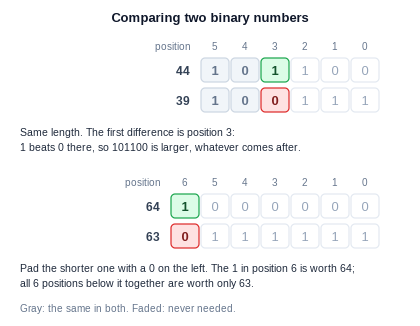
To put several binary numbers in order, apply the same test to each pair. Take 1100, 10, 1001, and 111. From smallest to largest they are 10, 111, 1001, 1100. The two-digit number comes first and the three-digit one next, and the two four-digit numbers are settled at position 2, where 1100 has the 1. Numerals written in different bases have to be converted to one base before they can be compared.
Bits and Bytes
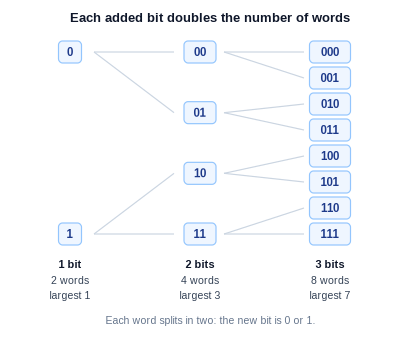
1 bit is a single bit of information, a 1 or a 0. Only two possible values.1 byte is 8 bits, an 8-bit word. Here are all the 8-bit words, first and last few:
| 8-bit word in base 2 | Value in base 10 |
|---|---|
| 00000000 | 0 |
| 00000001 | 1 |
| 00000010 | 2 |
| ... | ... |
| 11111110 | 254 |
| 11111111 | 255 |
Thus a byte is a string of 8 digits, each of which is 0 or 1. A byte can be used to represent numbers in the range from 0 to 255.
For example, 10100110 is a single byte. Read one position at a time, it is the number 166. We'll see later that a single byte can store a letter of the English alphabet.