Converting Between Bases
Going the other way needs a procedure
Reading a binary number in base 10 is arithmetic you can already do: multiply each digit by the weight of its column and add the results up. There is something in front of you to work on.Going from a decimal number to binary is not like that. Nothing can be read off, because the digits of the answer do not exist yet. You need a procedure, and there are two worth knowing. Method 1 is the one to use by hand. Method 2 is the one to turn into code.
Method 1: the biggest power of two that fits
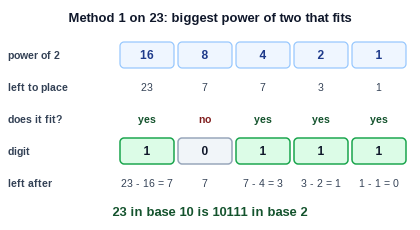
Given a number n in decimal. We'll explain this process for n = 23.1) Make a table of powers of 2 from right to left starting at 1, which is 2 to the power zero. Choose the biggest power of two that will fit into the number you are converting. Your table will end with this number. For example, if n = 23, 16 is the greatest power of two that will fit into 23.
2) Write a 1 beneath the 16 in the table for the leftmost binary digit. Then, subtract 16 from your initial number. You now have 7.
3) Using your new number (7), move down the chart marking how many times each power of 2 can fit into your dividend. 8 does not go into 7, so write a 0 beneath that box for the next binary digit to the right. Continue until you reach a number that can go into 7. Since 4 can fit into 7, mark it with a 1.
4) Subtract 4 from 7 to get 3. Then repeat this for 3.
| 16 | 8 | 4 | 2 | 1 |
|---|---|---|---|---|
| 1 | 0 | 1 | 1 | 1 |
Thus 23 in base 10 is 10111 in base 2. Every column gets a digit, including the ones you skipped: the zeros are what hold the other digits in their places.
Method 2: divide by two and keep the remainders
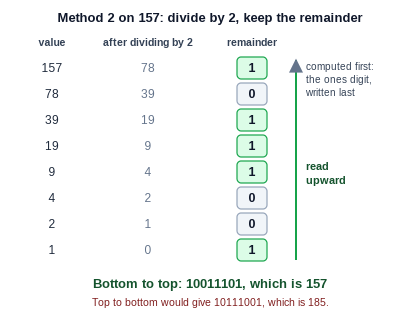
This method provides a nice algorithm for converting from decimal to binary. It is the one to write a function around, because every step is the same two operations no matter how big the number is. On tests and worksheets, Method 1 is the one to reach for.Repeatedly take the remainder on division by 2, then divide by 2, and stop at 0. The remainders you collect are the binary digits, read from the BOTTOM of the list back up to the top.
| value | after dividing by 2 | remainder |
|---|---|---|
| 157 | 78 | 1 |
| 78 | 39 | 0 |
| 39 | 19 | 1 |
| 19 | 9 | 1 |
| 9 | 4 | 1 |
| 4 | 2 | 0 |
| 2 | 1 | 0 |
| 1 | 0 | 1 |
Read the remainder column from the bottom row up to the top row: 10011101. So 157 in base 10 is 10011101 in base 2.
You have already written this loop
Back when you met the modulo operator, walking a decimal number one digit at a time was two operations:n % 10 hands back the last digit, and Math.floor(n / 10) throws that digit away. Repeat until nothing is left, and you have visited every digit.Method 2 is that same loop with the 10 replaced by a 2, because the base decides how big each column is:
let n = 157;
while (n > 0) {
  let bit = n % 2;
  n = Math.floor(n / 2);
  console.log(bit);
}
It prints eight lines for 157, one per remainder, in the order the divisions produce them. That order is the reverse of the order the digits are written in, so the answer is those eight lines read from the last one back to the first.
The program below runs Method 2 on 139 and prints each division. Each new remainder goes on the front of
digits, so the remainder computed first ends up as the rightmost digit. Run it, then change it and run it again:• Set
n to 157, and check each line against the table for 157.• Set
base to 10.• Press Reset, then change
digits = remainder + digits; to digits = digits + remainder;.let n = 139;
let base = 2;
let digits = "";
let value = n;
while (value > 0) {
let remainder = value % base;
console.log(value, "divided by", base, "is", Math.floor(value / base), "remainder", remainder);
digits = remainder + digits;
value = Math.floor(value / base);
}
console.log(n, "in base", base, "is", digits);
Output
Press Run to see what this program prints.
Note: This IDE is for experimenting with the code in this lesson. Your changes are not saved, and refreshing the page puts back the original lesson code.
Counting in a base other than ten
Counting in base 10 is so familiar that its rule is invisible. Run through every digit; when a column runs out of digits, set it back to 0 and add one to the column on its left. That is all that happens between 8, 9 and 10, or between 18, 19 and 20.Base 5 has only the digits 0, 1, 2, 3 and 4, so its columns run out sooner:
0, 1, 2, 3, 4, 10, 11, 12, 13, 14, 20
and further along, where two columns run out at once:
40, 41, 42, 43, 44, 100, 101, 102
Nothing there is special to five. Whatever the base, the last column rolls over as soon as it runs out of digits, and when every column has run out at once, a new column opens on the left.