Hexadecimal, Overflow and Round-Off
Hexadecimal
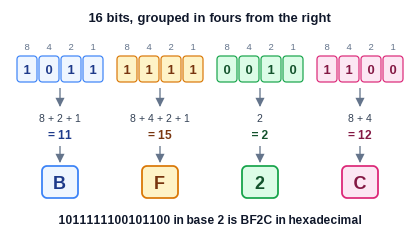
Binary code is too long in representation. Hexadecimal is much shorter. Hexadecimal uses 16 digits.Problem: we are short of numbers. Base 10 handed us ten symbols, 0 through 9, and hexadecimal needs six more. So the first six letters are pressed into service as digits: A is 10, B is 11, C is 12, D is 13, E is 14, F is 15.
Hexadecimal digits: 0, 1, 2, 3, 4 ... 9, A, B, C, D, E, F.
Every 4 bits become one hex digit
Converting a binary number to a hex number is relatively easy. Every 4 bits can convert to a hex digit, and the reason is a coincidence: four bits have exactly 16 patterns, and hexadecimal has exactly 16 digits.So: split the bits into groups of four starting from the RIGHT, read each group as a value from 0 to 15, then write that value as its single hex digit. Groups worth 0 through 9 keep the digit they already had. The six that need a letter are these.
| Group of 4 bits | Value | Hex digit |
|---|---|---|
| 1010 | 10 | A |
| 1011 | 11 | B |
| 1100 | 12 | C |
| 1101 | 13 | D |
| 1110 | 14 | E |
| 1111 | 15 | F |
Overflow error
In many programming languages, integers are stored in a fixed number of bits, which limits the range of values and the arithmetic you can do on them. This limitation can result in overflow or other errors.In Java, an int runs from -2,147,483,648 to +2,147,483,647. Compute a result bigger than that and it overflows, with no error message at all. Add 1 to 2,147,483,647 and the result wraps around to -2,147,483,648, and the program carries on with that wrong value. In other languages, an overflow stops the program with an error.
In JavaScript, ordinary numbers have no integer type of their own. Every plain number you write, whether it looks like 7 or like 7.5, is one 64-bit floating point value. So there is no separate integer ceiling to hit, and no error when a whole number outgrows its storage. What there is instead is a point past which whole numbers stop being stored one at a time.
The AP exam's pseudocode, the language of the exam reference sheet, takes a third approach. Its integers are limited only by the size of the computer's memory, so an integer in an exam question never overflows.
The largest value in n bits
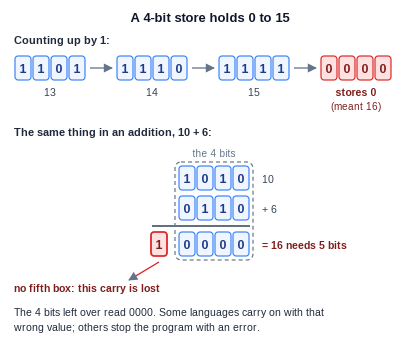
An unsigned integer stores only whole numbers from 0 upward. In n bits, its largest value is 2n - 1. Java's int is signed: it spends half of its 232 patterns on negative numbers. So its largest value is 2,147,483,647, which is 2^31 - 1.With 4 bits, the largest integer that can be stored is two to the fourth, minus one, which is 15. A 4-bit integer can hold any value in {0, 1, 2, ..., 15}. Storing the value of 10 + 6 = 16 would overflow, since 16 is 10000 in binary and that requires at least 5 bits.
If x is a 3-bit integer, storing 7 + 7 in x overflows. In binary that is 111 + 111, and the sum 1110 requires at least 4 bits.
Where JavaScript stops counting
A 64-bit float splits its bits between the digits of the number and its size, so it reaches enormous values but keeps only about 16 digits of any of them. For whole numbers that puts a hard boundary somewhere, and the language will tell you where.console.log(Number.MAX_SAFE_INTEGER);
That prints 9007199254740991, a little over nine quadrillion. Below the boundary, every whole number has a storable value of its own. Above it, they start sharing.
The enormous values end somewhere too. Past about 1.8 times ten to the 308th power, a float overflows and JavaScript gives up on the number altogether:
console.log(2 ** 1024); prints Infinity.BigInt, when you need the digits
If you do need whole numbers past that boundary, JavaScript has a second number type. Put an n on the end of the literal and you get a BigInt, a whole number with no fixed width at all: it grows to hold whatever you put in it.console.log(9007199254740991n + 1n);
console.log(9007199254740991n + 2n);
Those print 9007199254740992n and 9007199254740993n. Two different sums, two different values, and the trailing n is the language reminding you that these are BigInts rather than ordinary numbers.
But a BigInt will not mix with an ordinary number.
9007199254740991n + 1 adds nothing at all, it throws a TypeError telling you to convert one side yourself. And converting the BigInt down to a number is the step that loses the digits you switched types to keep.The program below doubles a number,
x, until adding 1 to it no longer changes it, and stops after 70 doublings if that never happens. Run it, then change it and run it again:• Change
doublings < 70 to doublings < 36.• Press Reset, then change
let x = 1; to let x = 1n;, so that x is a BigInt.let x = 1;
let doublings = 0;
while (x + 1 !== x && doublings < 70) {
x = x * 2;
doublings = doublings + 1;
}
console.log("Doublings:", doublings);
console.log("x:", x);
console.log("x + 1:", x + 1);
console.log("Same value:", x + 1 === x);
Output
Press Run to see what this program prints.
Note: This IDE is for experimenting with the code in this lesson. Your changes are not saved, and refreshing the page puts back the original lesson code.
Round-off errors
The boundary above is about whole numbers. Fractions have their own version of the problem, and theirs starts immediately.A fixed number of bits is used to store real numbers too. That limits their range and the arithmetic on them, and most of them can only be approximated. Round-off error is the name for that approximation.
console.log(1 / 3);
That prints 0.3333333333333333, which is not one third. One third written out in decimal never finishes, and the bits run out long before it does. The same thing happens in binary to fractions that look perfectly tidy in decimal, and that is where round-off error does its real damage: not in the awkward-looking numbers, but in the ordinary ones.
Take 0.1. In binary it is a repeating fraction, 0.000110011001100... with the 0011 going on forever. JavaScript stores the nearest 64-bit value instead, a hair more than 0.1. Add it up ten times and the small errors show:
let total = 0;
for (let i = 0; i < 10; i++) {
  total = total + 0.1;
}
console.log(total);
That prints 0.9999999999999999 where 1 was expected.