Encoding, Abstraction and Analog
Abstraction
Abstraction is the process of reducing complexity by focusing on the main idea. By hiding details that are irrelevant to the question at hand, and bringing together the details that are related and useful, abstraction reduces complexity and lets you think about the idea instead of the machinery.One type of abstraction we have already used is procedural abstraction, which provides a name for a procedure and allows it to be used knowing only what it does, not how it does it.
Bits are grouped to represent abstractions
Those abstractions include, but are not limited to, numbers, characters and colour.In the two lines below, sequences of 0s and 1s represent a string of characters and a numeric grade. A colour is built the same way, out of three numbers: how much red, how much green and how much blue, each one a whole number from 0 to 255.
name = "Mike Smith"
grade = 87
None of that storage is visible in the code. Underneath, both lines are nothing but 0s and 1s.
Encoding
A computer cannot store letters or pictures. It can only work with bits, a 0 or a 1.To represent anything other than bits, we need rules that let us convert a sequence of bits into letters or pictures. That set of rules is called an encoding scheme, or an encoding for short. Here is one sequence of bits, read under the rules of ASCII:
01100010 01101001 01110100 01110011
b        i        t        s
ASCII
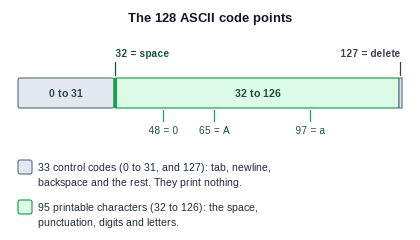
ASCII (American Standard Code for Information Interchange) is an encoding scheme that specifies the mapping between bits and characters. There are 128 characters in the scheme. Of those, 95 are printable, starting with the space at code point 32. The other 33 are control codes that print nothing, such as tab, newline and backspace: code points 0 to 31, and 127.The printable characters include a-z, A-Z, 0-9 and punctuation. In ASCII, 65 represents A, 66 represents B, and so on. Those numbers are called code points.
| bits | code point | character |
|---|---|---|
| 01000001 | 65 | A |
| 01000010 | 66 | B |
| 01000011 | 67 | C |
| 01000100 | 68 | D |
| 01000101 | 69 | E |
| 01000110 | 70 | F |
The program below writes the code point of each character of a word in binary.
ord gives the code point, a divide-by-two loop writes it in binary, and zeros are added on the left to make eight bits. Run it, then change it and run it again:• Change
"Owl" to your own name.• Change the 8 in
len(bits) < 8 to 7.word = "Owl"
for letter in word:
code = ord(letter)
bits = ""
value = code
while value > 0:
bits = str(value % 2) + bits
value = value // 2
while len(bits) < 8:
bits = "0" + bits
print(letter, code, bits)
Output
Press Run to see what this program prints.
Note: This IDE is for experimenting with the code in this lesson. Your changes are not saved, and refreshing the page puts back the original lesson code.
Unicode is not an encoding
So how many bits does Unicode use to encode all these characters? None. Because Unicode is not an encoding.Unicode first and foremost defines a table of code points for characters. That is a fancy way of saying 65 stands for A, 66 stands for B, and 9,731 stands for a snowman.
To represent 1,114,112 different values, two bytes are not enough. Three bytes are, but three bytes are often awkward to work with, so four bytes would be the comfortable minimum.
The UTF encodings
UTF-32, UTF-16 and UTF-8 are three encodings that use the Unicode table of code points. Unicode says which number a character is. A UTF encoding says how that number is written as bits.UTF-32 encodes every code point in 32 bits, four bytes per character. It is very simple, and it often wastes a lot of space: an English document bloats to four times its necessary size, most of the extra being zeros.
UTF-16 and UTF-8 are variable-length encodings. If a character can be represented in a single byte, because its code point is a very small number, UTF-8 encodes it in a single byte. If it needs two, UTF-8 uses two, and so on. UTF-16 sits in the middle, using at least two bytes and growing to four as necessary.
Of the three, UTF-8 is by far the most widely used. It is the standard encoding for email and for webpages.
| character | UTF-8 | UTF-16 | UTF-32 |
|---|---|---|---|
| A | 1 byte | 2 bytes | 4 bytes |
| あ | 3 bytes | 2 bytes | 4 bytes |
Digital and analog
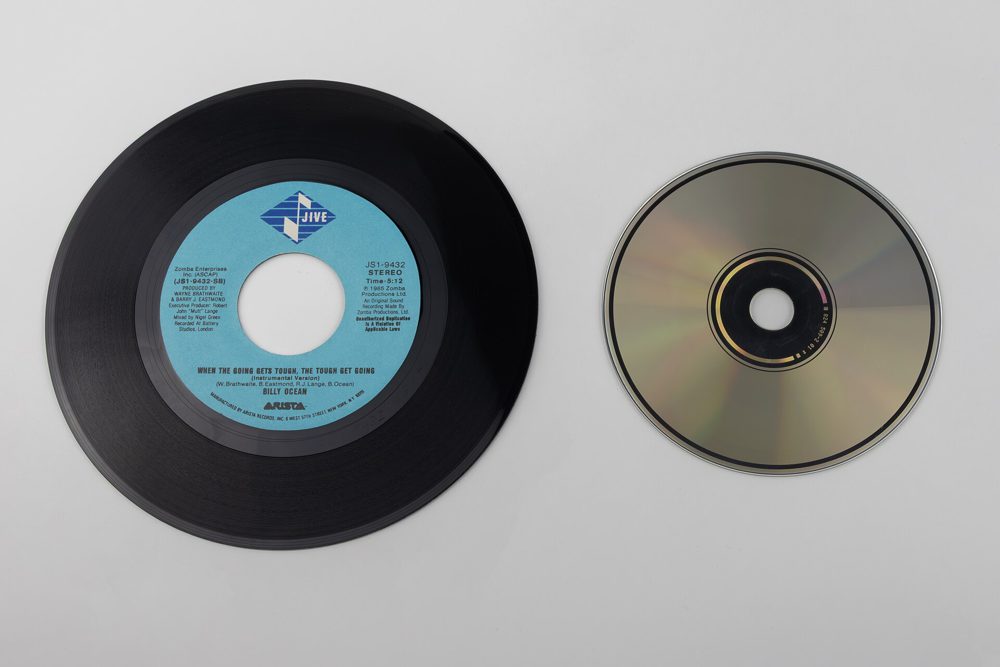
Computers can only understand digital data: discrete values, like a list of integers or a sequence of 0s and 1s.Analog data have values that change smoothly, rather than in discrete intervals, over time. Temperatures over a period of time, the pitch and volume of music, the colours of a painting and the position of a sprinter during a race are all analog.
Analog signals are continuous and can take on infinitely many values, the real numbers. Digital signals are finite: an 8-bit colour is one of 256 discrete possibilities, while an actual colour can be any of infinitely many shades.
Bits per sample
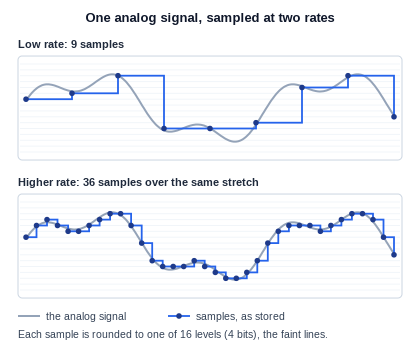
Each sample is a measurement, stored using a set number of bits. That number of bits decides how many different values a sample can take. CD audio stores each sample in 16 bits, so a sample can be any of 2^16 = 65,536 levels. A true value that falls between two levels is rounded to the nearer one. The figure above gives each sample only 4 bits, 16 levels, so the rounding is easy to see.Using digital data to approximate analog data in this way is an example of abstraction. The samples keep the details that matter, how the signal rises and falls, and hide the infinitely many values in between, which no file could hold.