Social Engineering, Phishing and Malware
How Hackers Hack
One of the most common ways hackers get into a computer system is by tricking people into letting them in rather than by hacking.Social engineering is when a person is tricked into revealing confidential information.
The attack does not go through the defences. It goes through somebody who is allowed past them.
Phishing
Phishing is a technique that attempts to trick a user into providing personal information. That information can then be used to access sensitive online resources, such as bank accounts and email. Email is the usual channel, and the same trick also arrives by text message, phone call and social media message. In a typical phishing attack, a hacker impersonates either a legitimate person or a corporation through an email. The email asks the user to take an action that would give the phisher an access point to critical data or information.• the phisher spoofs the logo or website of a well-known corporation or individual so their email request appears legitimate
• they may contact an HR department, posing as a trusted source, to get information such as W2 forms and Social Security numbers
One example: an email from Bank of America asking the reader to reset their password by clicking a link to a Bank of America clone site. Login credentials are compromised if account holders attempt to log on. Even with less than a 1 percent success rate, a million phishing emails can possibly yield thousands of accounts.
Avoiding a Phishing Attack
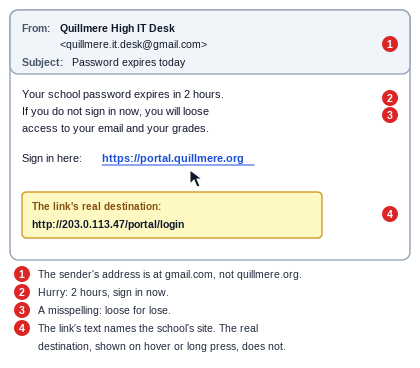
• Pay attention to anything that may be slightly wrong with an email, including misspellings, strange syntax, or logos that have been slightly altered.
• Never click on a suspicious link within an email.
• Before following a link, in an email or on a web page, check its real destination: rest the pointer on it, or press and hold it on a phone. A malicious link can be disguised on a web page as easily as in an email. A link's words and its destination are set separately.
• Treat unsolicited emails, attachments, links and forms in emails with suspicion, even from someone you know. A known sender's account may have been compromised and the message sent from it by somebody else.
Public Networks
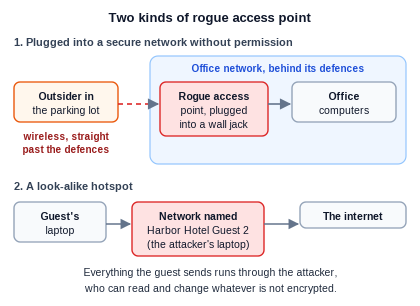
Data sent over public networks can be intercepted, analyzed, and modified. One way this can happen is through a rogue access point, a wireless access point that gives unauthorized access to secure networks.A rogue access point can be a wireless device plugged into an organisation's network without permission, which lets someone outside connect straight past the network's defences. It can also be a hotspot an attacker sets up with an official-looking name. People join it, and their traffic runs through the attacker's machine, where anything not encrypted can be read and changed.
Hackers
White hats are hackers hired to evaluate a system's security, and to find bugs and security holes in software.Black hats are malicious hackers who intend to steal, exploit or sell private data. There is a film about one, Blackhat, from 2015, starring Chris Hemsworth.
Why hackers hack:
• for curiosity and amusement
• for monetary gain, which makes them cybercriminals
• to promote a political or social goal, which makes them hacktivists
Malware
Malware is software intended to damage a computing system or to take partial control over its operation. Emails can be a common delivery mechanism for trojan horses, programs that masquerade as harmless attachments, like a photo, but contain malware.| Form of malware | What it does |
|---|---|
| Spyware | Steals confidential data |
| Keylogger | Records every keystroke and sends it to a remote source, to gain fraudulent access to passwords and other confidential information |
| Ransomware | Encrypts your data and demands a ransom |
| Virus | A malicious program that can copy itself and gain access to a computer in an unauthorized way. It often attaches itself to a legitimate program and then starts running independently, deleting files or slowing the computer down |
Protecting a Computer
Untrustworthy downloads, often free ones from freeware or shareware sites, can contain malware. A free game or file converter from a site you do not know may install something else alongside it.Computer virus and malware scanning software, often called antivirus software, can help protect a computing system against infection. It checks files and programs against known malware and blocks or removes what it finds.
All real-world systems have errors or design flaws that can be exploited to compromise them. Regular software updates help fix errors that could compromise a computing system, so an update is worth installing when it arrives rather than weeks later.