IPv4, Private Addresses and IPv6
IP Address (IPv4)
The IP address is a 32-bit number. It identifies on which network the computer is located, as well as differentiating the computer from all other devices on the same network. A public IP address is unique across the whole Internet. A private one, later in this lesson, is unique only inside its own network.The address is divided into four 8-bit parts. The format is A.B.C.D, where A, B, C and D are the decimal equivalent of the 8-bit binary value. Each value is in the range 0 to 255.
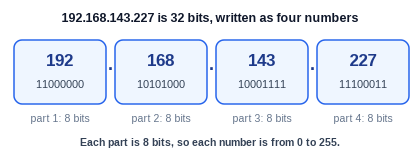
The program below turns four 8-bit parts into an IPv4 address. It reads each part one bit at a time from the left. Every 1 adds its weight to the part's value: 128, 64, 32, 16, 8, 4, 2, and 1. Run it, then change it and run it again:
• Change the first part to "11111111".
• Change the last part to "00000000".
• Change the first bit of the third part from 0 to 1, and compare the third number with the first run.
parts = ["10000011", "00111010", "00010101", "11101100"]
address = ""
for part in parts:
    weight = 128
    value = 0
    for bit in part:
        if bit == "1":
            value = value + weight
        weight = weight // 2
    print(part, "is", value)
    if address == "":
        address = str(value)
    else:
        address = address + "." + str(value)
print("Address:", address)
Output
Press Run to see what this program prints.
Note: This IDE is for experimenting with the code in this lesson. Your changes are not saved, and refreshing the page puts back the original lesson code.
An IP address can also be read by what each section of it identifies. The network number, at the start, says which network. The host ID number, at the end, picks out one computer, or host, on that network. Some networks also divide themselves into subnets, marked by a section in between. Where one section ends and the next begins is not fixed by the address itself. Each network's configuration sets it. Here is one way the address 192.168.143.227 can be split.
| Part of 192.168.143.227 | What it is called | What it identifies |
|---|---|---|
| 192.168 | The network number | The network |
| 143 | The subnet | A subdivision of that network |
| 227 | The host ID number | The particular computer, or host |
There are not enough
For IPv4, with 32 bits, there are a total of 4,294,967,296 addresses.That is not a lot, considering the number of tablets, smartphones, smart TVs, streaming boxes and laptops in each home. Count the connected devices in one house and multiply by the number of houses.
To conserve the public IP address space, private IP addresses are used within private networks. These private addresses are not valid addresses for Internet use.
The three address blocks for private IP addresses are:
| Starts at | Ends at |
|---|---|
| 10.0.0.0 | 10.255.255.255 |
| 172.16.0.0 | 172.31.255.255 |
| 192.168.0.0 | 192.168.255.255 |
Private IP Addresses
In a small LAN, the computers and hosts are assigned private IP addresses that identify them locally.When a computer makes a request for a resource outside of its LAN, for example a news site's webpage, the request passes through the router that is responsible for data packets leaving and entering the network. This router is known as the default gateway.
The Internet Service Provider (ISP) assigns one public IP address to the entire network. Any outside traffic to and from computers inside the network is routed to this public IP address.
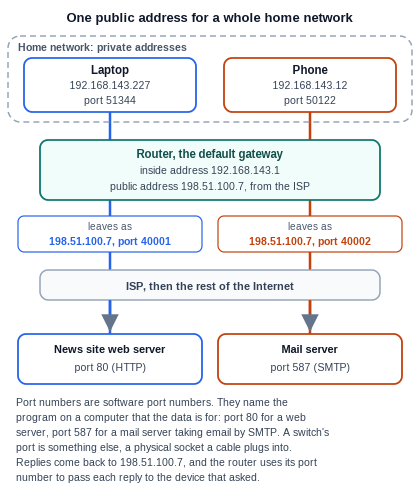
The figure adds one detail, the port numbers. A port number is a software idea. It tells the receiving computer which program the data is for. Port 80 is for a web server answering HTTP requests, and port 587 for a mail server receiving email from a mail app by SMTP. It has nothing to do with the physical ports on a switch, the sockets a cable plugs into.
The router also gives each outgoing request a port number of its own on the public side. That number tells it which computer in the house each reply belongs to.
IP Address (IPv6)
IPv6 uses 128 bits, for a total of approximately 3.4 times 10 to the 38th power addresses.The address is divided into eight 16-bit parts. The format is 8 groups of four hexadecimal digits.
Both versions are in use today. IPv4 is the older one and still carries a large share of Internet traffic, and IPv6 carries a growing share alongside it.