Protocols, TCP/IP and the Web
Network Applications
A network application lets a computer interact with other computers by performing a specific set of tasks. Browsers and email clients are network applications.The application is responsible for managing the transmitting and receiving of the data required to perform its tasks.
And the application has to be able to communicate with applications on other networked computers for it to be useful. A browser with nothing to talk to is a window onto nothing.
The World Wide Web and HTTP
The World Wide Web is a system of linked pages, programs and files. The World Wide Web uses the Internet.HTTP, the Hypertext Transfer Protocol, is a protocol used by the World Wide Web for sending and receiving webpages.
Network protocols
A network protocol is a set of rules for how applications intercommunicate. Several of them have names worth knowing.| Protocol | What the letters stand for | What it is for |
|---|---|---|
| SMTP | Simple Mail Transfer Protocol | Sending email |
| HTTP | Hypertext Transfer Protocol | Sending and receiving webpages |
| HTTPS | HTTP Secure | The same job as HTTP, with the contents encrypted |
Other protocols exist for other jobs, such as SSH for logging in to a distant computer securely and FTP for transferring files. They are outside the AP course. Encryption itself is part of the course, but the mathematics HTTPS uses to encrypt is not.
TCP/IP
IP, TCP and UDP are common protocols used on the Internet, and they share the work. The Internet Protocol (IP) puts the source and destination IP addresses on every packet. Routers read those addresses to send each packet from network to network until it reaches its destination. IP on its own does not promise that every packet arrives, or that packets arrive in the order they were sent. Transmission Control Protocol (TCP) adds those promises.TCP is a host-to-host protocol that provides reliable, connection-oriented communication over IP networks between two endpoints. TCP's data travels inside IP packets, using IP addresses, hence the term TCP/IP.
Reliable means the data received is intact, error-free and assembled in the correct order. Any lost data is retransmitted.
Connection-oriented means that, using a system of acknowledgements called the Three-Way Handshake, the two computers confirm the connection before any data is transmitted.
Another protocol similar to TCP is User Datagram Protocol (UDP), which is a connectionless protocol. Unlike TCP, UDP has no guarantee of delivery or correct assembly. It requires less overhead and is faster. That suits data that is only useful on time, such as a live broadcast or an online game. There, a piece that turns up late is no longer worth waiting for.
| TCP | UDP | |
|---|---|---|
| Before sending | The two computers confirm the connection first | Nothing is confirmed; the data is sent |
| If data is lost | It is retransmitted | It is gone, and there is no guarantee of delivery |
| Order of arrival | Assembled in the correct order | No guarantee of correct assembly |
| Cost of all that | More overhead | Less overhead, and faster |
Higher-level protocols
In addition to lower-level protocols such as TCP/IP, there are higher-level protocols, meaning protocols that operate on top of TCP/IP, such as HTTP.Computers on the Internet need to know not only how to send data to each other, but also what to do with the data. For example, when you are viewing websites, your computer is communicating using HTTP.
This is also the reason you sometimes see web addresses that begin with http:// or https://. That part indicates to the browser which protocol to use.
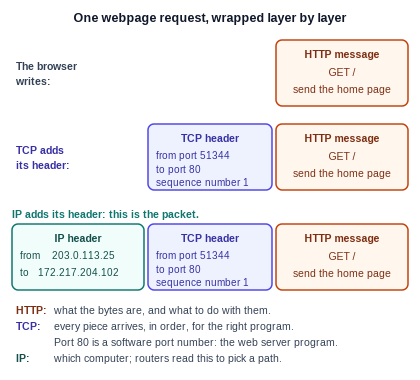
The figure follows one request to 172.217.204.102, the address that name resolution, at the end of this lesson, finds for www.google.com. TCP's header carries port numbers, software numbers that name the program the data is for, and a sequence number for putting the pieces back in order. IP's header carries the two IP addresses. The result is the packet that routers send across the Internet.
Domain names and name resolution
Logical IP addresses are friendlier than physical MAC addresses, but they still are not human readable.Domain names are structured, user friendly names for computers on the Internet. Examples of top-level domain names are .com, .org, .edu and .gov.
Name resolution is the process of mapping logical addresses back and forth into domain names. The address 172.217.204.102 is mapped to www.google.com. Special name servers store the mapping information in databases. The Domain Name System (DNS) provides a hierarchy of name servers that handle name resolution for the Internet.
| Where it sits | Example | |
|---|---|---|
| Regular domain | The standard URL | cnn.com or google.com |
| Subdomain | An extension in front of the regular domain | support.somesoftware.com |
| Directory | An extension at the end of the URL | apexam.com/webinars |